🚀 Introduction
Sometimes you want to share links only with specific people. With 9to.in, you can protect your short links using a password, ensuring that only authorized users can access the content.
This feature is ideal for private campaigns, confidential documents, or restricted offers.
🔐 What is Password Protection?
Password protection allows you to:
Restrict access to your link
Share content securely
Prevent unauthorized users from viewing your page
When someone clicks your link, they must enter the correct password before accessing the destination.
🛠️ Step-by-Step: Enable Password Protection
🔗 Step 1: Open Create Link
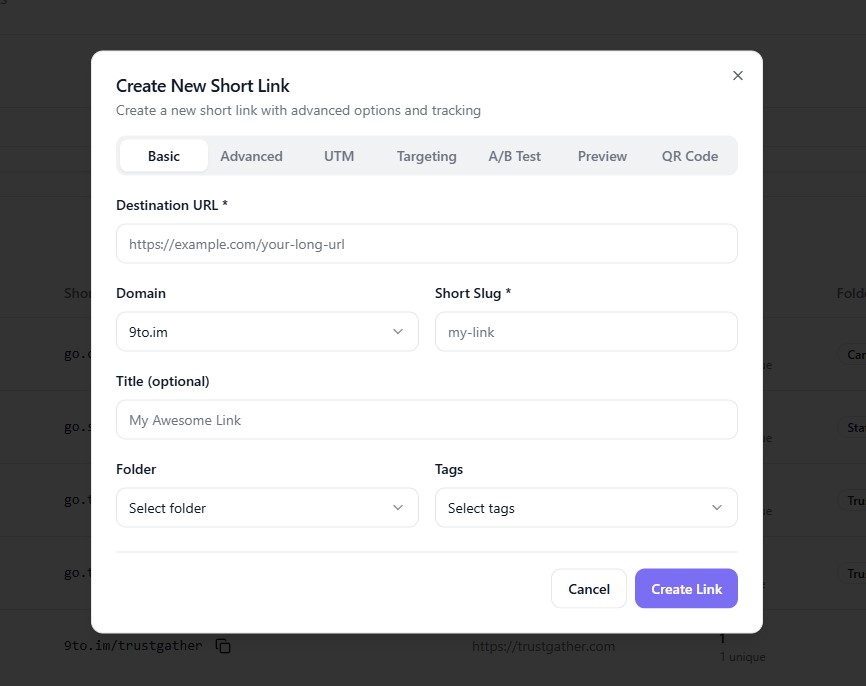
Go to Links dashboard
Click + Create Link
⚙️ Step 2: Enter Basic Link Details
In the Basic tab:
Add your Destination URL
Select your Domain
Set your Short Slug
🔒 Step 3: Go to Advanced Settings
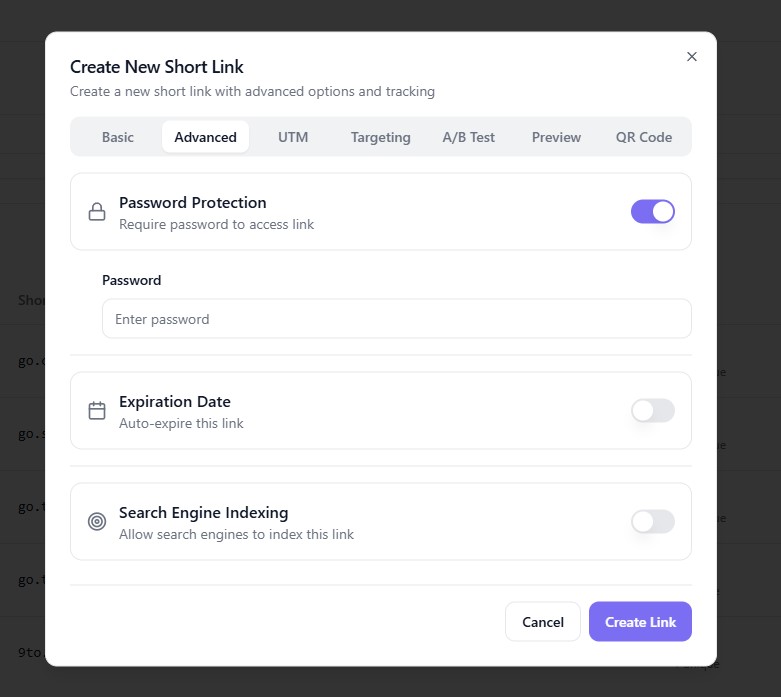
Click on:
👉 Advanced
This is where you can configure additional link settings.
🔑 Step 4: Enable Password Protection
Find Password Protection
Toggle it ON
Enter your desired password:
👉 Example: Offer2026
⚠️ Step 5: Save Your Settings
Make sure your password is:
Strong and secure
Easy to share with intended users
✅ Step 6: Create the Link
Click:
👉 Create Link
Your link is now password-protected.
⚡ How It Works
When someone clicks your link:
A password screen appears
User enters the correct password
Access is granted to the destination URL
If the password is incorrect, access is denied.
🎯 Use Cases
Password-protected links are useful for:
🔒 Sharing confidential documents
🎁 Exclusive offers or deals
👥 Private client resources
🧾 Internal team content
🎓 Paid or gated content
💡 Best Practices
✅ Use strong passwords (mix of letters, numbers)
✅ Share password securely (not publicly)
✅ Change passwords periodically
✅ Combine with link expiration for extra security
❌ Common Mistakes to Avoid
❌ Using weak passwords like “1234”
❌ Sharing password publicly
❌ Forgetting to update password when needed
❌ Not informing users about password requirement
🔥 Pro Tips
Combine password protection with:
⏳ Link expiration
📊 Analytics tracking
🎯 Targeting rules
Use it to:
Create exclusive access campaigns
Secure sensitive information
🏁 Conclusion
Password protection in 9to.in helps you control access and keep your links secure. Whether you're sharing private content or exclusive offers, this feature ensures only the right audience can view your links.
Start protecting your links and enhance your content security today 🔐