🚀 Introduction
Managing how long your links stay active is important for time-sensitive campaigns. With 9to.in, you can set expiration dates for links and define fallback URLs to redirect users after the link expires.
This ensures a better user experience and avoids broken links.
⏳ What is Link Expiration?
Link expiration allows you to:
Automatically disable a link after a specific date
Control campaign duration
Prevent outdated content from being accessed
Example:
Offer valid until 31st Dec → Link expires automatically after that
🔁 What is a Fallback URL?
A fallback URL is where users are redirected after a link expires.
Example:
Expired offer → Redirect to homepage
Old campaign → Redirect to latest campaign page
👉 This ensures users never see an error page.
🛠️ Step-by-Step: Set Link Expiration
🔗 Step 1: Open Create Link
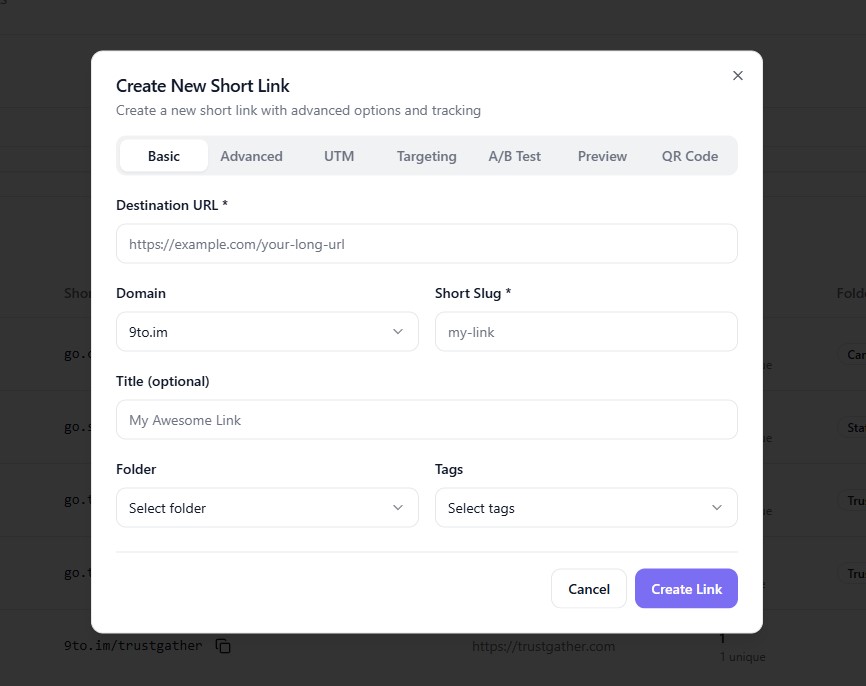
Go to Links dashboard
Click + Create Link
⚙️ Step 2: Enter Basic Link Details
In the Basic tab:
Add your Destination URL
Select your Domain
Set your Short Slug
🔧 Step 3: Go to Advanced Settings
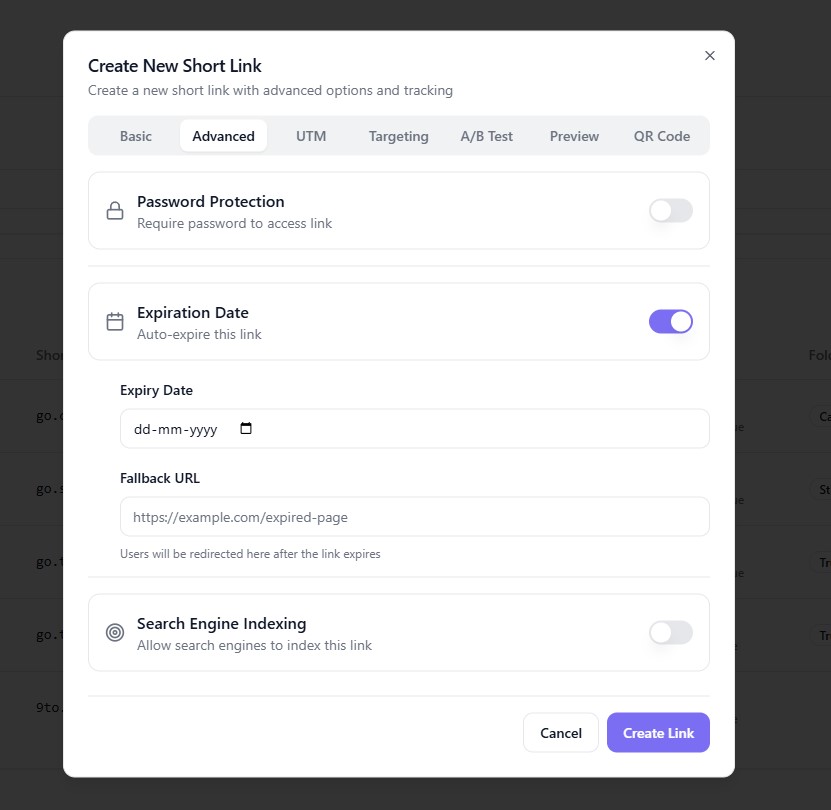
Click on:
👉 Advanced
⏳ Step 4: Enable Link Expiration
Find Expiration Date
Enable or select the date
👉 Choose the date when your link should stop working.
🔁 Step 5: Add Fallback URL
Locate Fallback URL
Enter the URL where users should be redirected after expiration
👉 Example: https://example.com/new-offer
✅ Step 6: Create the Link
Click:
👉 Create Link
Your link will now expire automatically and redirect users accordingly.
⚡ How It Works
When a user clicks your link:
✅ Before expiration → Redirects to main destination
⛔ After expiration → Redirects to fallback URL
🎯 Use Cases
Link expiration is useful for:
🎉 Limited-time offers
🎟️ Event registrations
🛒 Flash sales
📢 Seasonal campaigns
📄 Temporary content sharing
💡 Best Practices
✅ Always set a fallback URL
✅ Clearly define campaign duration
✅ Use expiration for time-sensitive links
✅ Combine with UTM tracking for analysis
❌ Common Mistakes to Avoid
❌ Not setting a fallback URL
❌ Letting expired links lead to dead pages
❌ Forgetting expiration for limited offers
❌ Using outdated fallback pages
🔥 Pro Tips
Combine expiration with:
🔐 Password protection
🎯 Geo targeting
📊 Analytics
Use fallback URLs to:
Redirect to new campaigns
Capture leads instead of losing traffic
🏁 Conclusion
Setting link expiration and fallback URLs in 9to.in helps you manage campaigns efficiently while ensuring users always land on a relevant page. It prevents broken experiences and keeps your marketing clean and effective.
Start using expiration rules to take full control of your links ⏳🚀