🚀 Introduction
A/B testing (also known as split testing) helps you compare multiple versions of a URL to see which performs better. With 9to.in, you can easily split traffic between different links and automatically identify the best-performing one.
This is a powerful way to improve click-through rates and conversions.
🧪 What is A/B Testing?
A/B testing allows you to:
Test multiple landing pages
Compare performance of campaigns
Identify which version gets more clicks or conversions
Example:
Version A → Landing Page 1
Version B → Landing Page 2
Traffic is split between both, and the best-performing version wins.
🛠️ Step-by-Step: Run A/B Testing
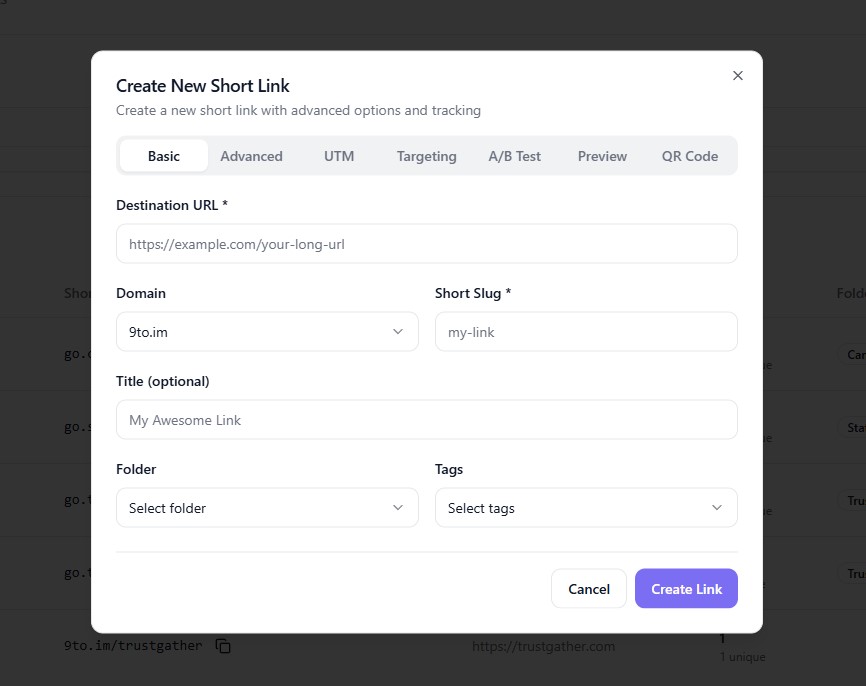
🔗 Step 1: Open Create Link
Go to Links dashboard
Click + Create Link
⚙️ Step 2: Enter Basic Link Details
In the Basic tab:
Add your Destination URL (default fallback)
Select your Domain
Set your Short Slug
🧪 Step 3: Go to A/B Test Tab
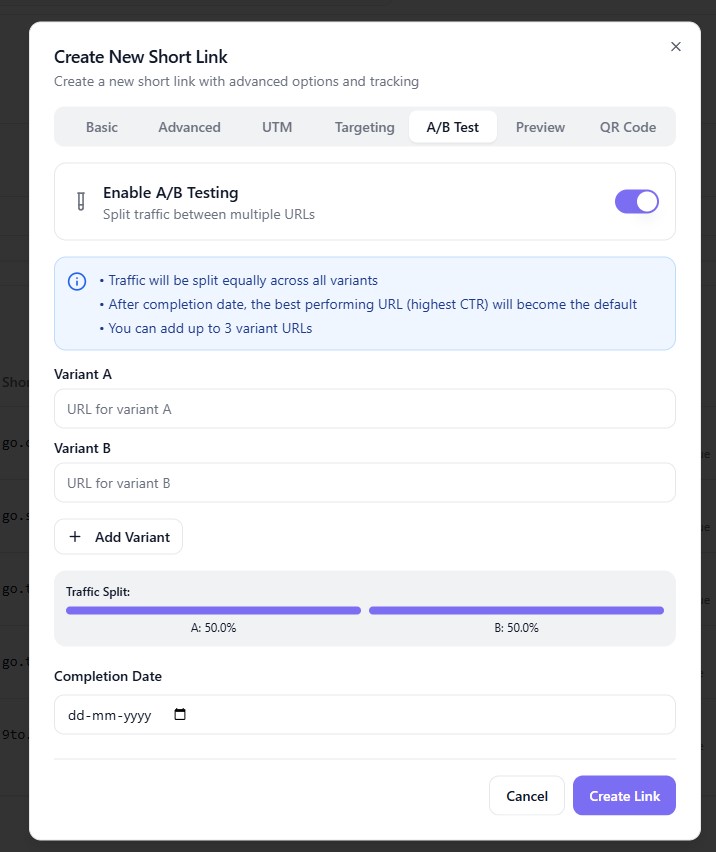
Click on:
👉 A/B Test
This is where you configure split testing.
🔘 Step 4: Enable A/B Testing
Toggle ON:
👉 Enable A/B Testing
You will now see options to add multiple variants.
🔗 Step 5: Add Variants (URLs)
Add different URLs you want to test:
Variant A → First URL
Variant B → Second URL
👉 You can also click Add Variant to include more options.
⚖️ Step 6: Set Traffic Split
Control how traffic is distributed:
Example:
A → 50%
B → 50%
👉 You can adjust the split based on your strategy.
📅 Step 7: Set Completion Date
(Optional)
Define when the test should end
After completion, the best-performing URL becomes default
✅ Step 8: Create the Link
Click:
👉 Create Link
Your A/B test is now live.
⚡ How A/B Testing Works
When users click your link:
Traffic is split between variants
Each version receives visitors
Performance is tracked automatically
Best-performing link is identified
📊 Where to View Results
You can track results inside 9to:
Click analytics
Performance comparison
Conversion insights
👉 Use this data to optimize your campaigns.
🎯 Use Cases
A/B testing is ideal for:
📢 Landing page optimization
💰 Paid ad campaigns
📧 Email marketing links
🛒 Product page testing
🎨 Design or messaging experiments
💡 Best Practices
✅ Test only one variable at a time (headline, design, CTA)
✅ Use equal traffic split for fair comparison
✅ Run tests long enough for meaningful data
✅ Track results consistently
✅ Combine with UTM tracking
❌ Common Mistakes to Avoid
❌ Testing too many variables at once
❌ Ending tests too early
❌ Ignoring data insights
❌ Not using enough traffic
❌ Not setting a clear goal
🔥 Pro Tips
Combine A/B testing with:
📊 Analytics insights
🎯 Geo targeting
📱 Device targeting
Use it to:
Improve conversion rates
Optimize marketing campaigns
Increase ROI
🏁 Conclusion
A/B testing in 9to.in helps you make data-driven decisions by identifying what works best. Instead of guessing, you can test, measure, and optimize your links for maximum performance.
Start running A/B tests and unlock better results from every click 🚀