🚀 Introduction
As your number of links grows, managing them efficiently becomes crucial. With 9to.in, you can organize your links using folders and tags to keep everything structured, searchable, and easy to manage.
This guide will help you understand how to use both features effectively.
📂 What are Folders?
Folders help you group related links together.
Example:
Campaign folders (e.g., Diwali Campaign)
Client folders (e.g., Client A, Client B)
Product folders (e.g., Product Launch)
👉 Folders are best for broad organization.
🏷️ What are Tags?
Tags help you label and filter links across folders.
Example:
facebookemail_campaignsummer_sale
👉 Tags are best for flexible categorization and filtering.
🛠️ How to Create and Use Folders
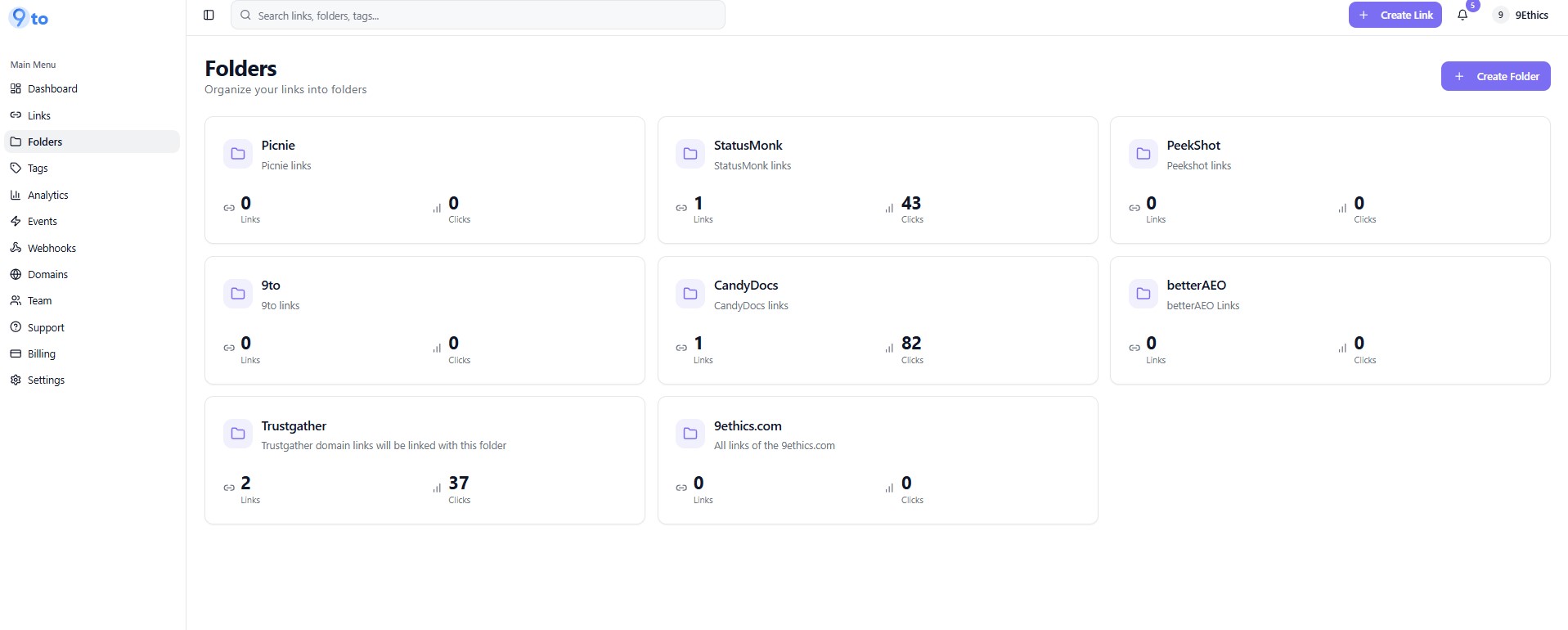
📁 Step 1: Go to Folders Section
From the left sidebar, click 👉 Folders
You will see a screen like this:
➕ Step 2: Create a New Folder
Click on 👉 Create Folder
Enter a folder name
Save it
🔗 Step 3: Assign Links to Folder
While creating a link:
Go to Basic tab
Select a folder from the Folder dropdown
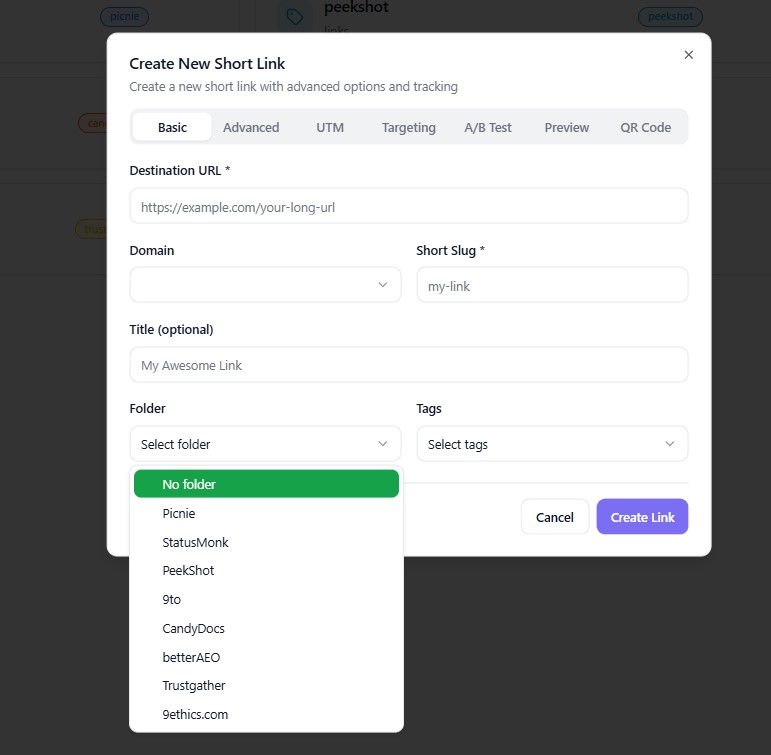
👉 Your link will now be grouped under that folder.
📊 Step 4: View Folder Performance
Each folder shows:
Number of links
Total clicks
👉 This helps you analyze performance at a group level.
🛠️ How to Create and Use Tags
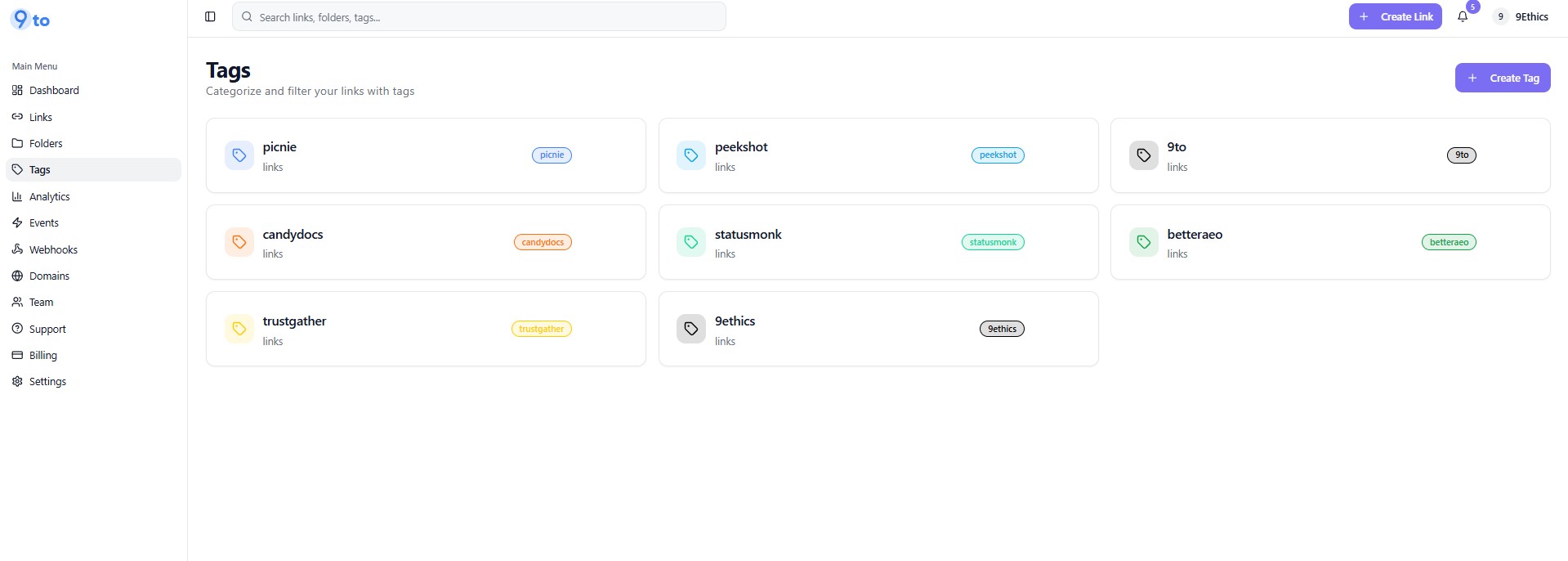
🏷️ Step 1: Go to Tags Section
Click 👉 Tags from sidebar
You will see all your tags:
➕ Step 2: Create a Tag
Click 👉 Create Tag
Enter tag name
Save it
🔗 Step 3: Assign Tags to Links
While creating a link:
Select tags in the Tags dropdown
You can assign multiple tags to a single link
🔍 Step 4: Filter Links Using Tags
In the Links or Analytics section:
Use filters to view links by specific tags
👉 This helps you track campaigns easily.
⚖️ Folder vs Tags (When to Use What)
Feature | Best For |
|---|---|
Folders | Organizing links into groups (clients, campaigns) |
Tags | Labeling links for filtering and tracking |
👉 Use both together for maximum efficiency.
🎯 Use Cases
📢 Marketing campaigns organization
👥 Client-based link management
🛒 Product-based grouping
📊 Campaign performance tracking
📂 Internal team workflows
💡 Best Practices
✅ Use folders for main structure
✅ Use tags for cross-filtering
✅ Keep naming consistent
✅ Avoid too many unnecessary tags
✅ Review and clean up regularly
❌ Common Mistakes to Avoid
❌ Using only folders without tags
❌ Creating too many folders unnecessarily
❌ Inconsistent naming (e.g., FB, Facebook, fb)
❌ Not organizing links from the start
🔥 Pro Tips
Combine folders and tags with:
📊 Analytics tracking
🎯 Campaign segmentation
🧪 A/B testing
Example strategy:
Folder → “Diwali Campaign”
Tags →
facebook,email,ads
👉 This gives both structure and flexibility.
🏁 Conclusion
Using folders and tags in 9to.in helps you stay organized, save time, and manage links efficiently. As your campaigns grow, this structure becomes essential for better tracking and performance analysis.
Start organizing your links today and take full control of your link management 🚀