🚀 Introduction
Device-based routing allows you to redirect users based on the device they are using, such as mobile or desktop. With 9to.in, you can ensure users always land on the most optimized version of your page.
This is especially useful when you have:
Separate mobile and desktop websites
App download pages
Device-specific user experiences
📱 What is Device-Based Routing?
Device-based routing detects whether a user is on:
📱 Mobile
💻 Desktop
And redirects them to different URLs accordingly.
Example:
Mobile users →
https://m.example.comDesktop users →
https://www.example.com
🛠️ Step-by-Step: Enable Device-Based Routing
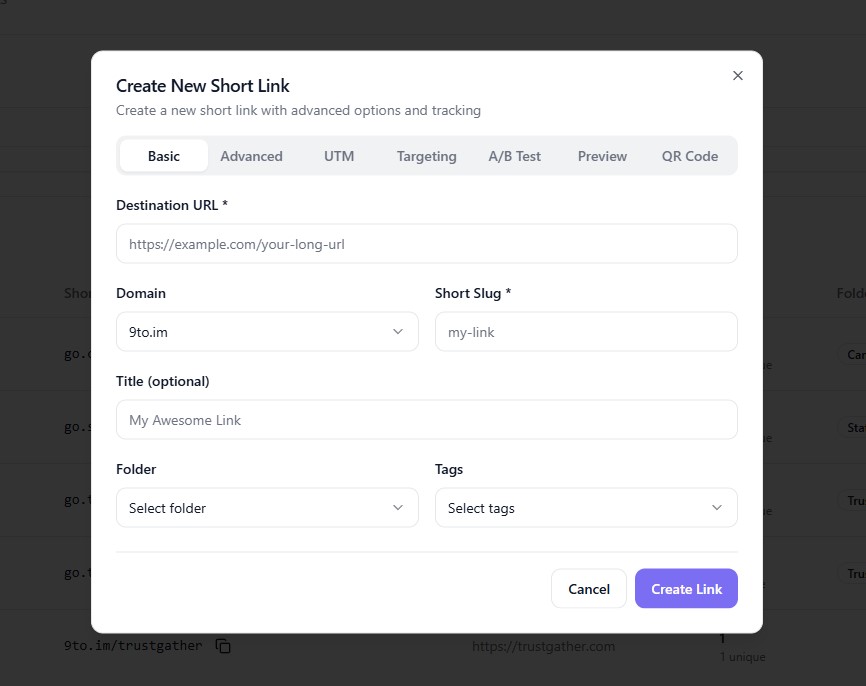
🔗 Step 1: Open Create Link
Go to Links dashboard
Click + Create Link
⚙️ Step 2: Enter Basic Link Details
In the Basic tab:
Add your Destination URL (default fallback)
Select your Domain
Set your Short Slug
🎯 Step 3: Go to Targeting Tab
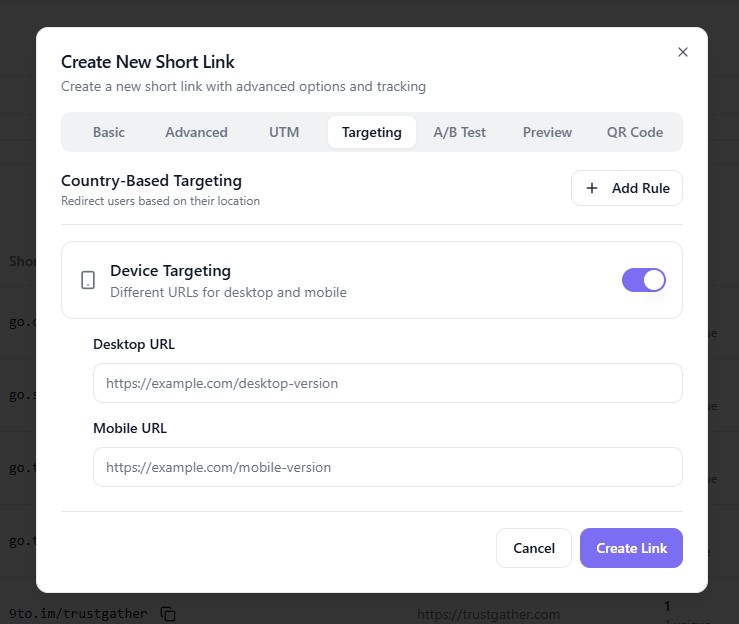
Click on:
👉 Targeting
This section allows you to configure routing rules.
📲 Step 4: Enable Device Targeting
Find Device Targeting and toggle it ON.
Once enabled, you will see:
Desktop URL
Mobile URL
🌐 Step 5: Add Device-Specific URLs
Enter your URLs:
Desktop URL → for laptop/desktop users
Mobile URL → for smartphone users
Example:
Desktop →
https://example.comMobile →
https://m.example.com
🔁 Step 6: Set Fallback URL
Your Destination URL (from Basic tab) will act as:
Default fallback
Used if device detection fails
✅ Step 7: Create the Link
Click:
👉 Create Link
Your device-based routing is now active.
⚡ How It Works
When a user clicks your link:
9to detects the device type
Matches it with your routing rules
Redirects instantly to the correct URL
🎯 Use Cases
Device-based routing is useful for:
📲 Mobile app promotions
🛒 Mobile vs desktop shopping experiences
📥 App download pages
🌐 Progressive web apps
📢 Campaign-specific landing pages
💡 Best Practices
✅ Always optimize landing pages for each device
✅ Use fast-loading mobile pages
✅ Combine with geo targeting for better personalization
✅ Test links on different devices
✅ Keep URLs consistent with branding
❌ Common Mistakes to Avoid
❌ Sending mobile users to desktop pages
❌ Not testing device redirects
❌ Missing fallback URL
❌ Using broken or slow mobile pages
🔥 Pro Tips
Combine device targeting with:
🌍 Geo targeting
📊 Analytics tracking
🧪 A/B testing
Use it for:
App install campaigns
Device-specific offers
🏁 Conclusion
Device-based routing in 9to.in helps you deliver a seamless experience across devices. By sending users to the right destination, you improve engagement, reduce bounce rates, and increase conversions.
Start using device targeting to make your links smarter and more effective 🚀