🚀 Introduction
Understanding how your links work is key to improving marketing performance. With 9to.in, every link you create becomes a powerful tool for tracking, targeting, and optimization.
This guide explains the complete workflow—from creating a link to analyzing its performance.
🔄 The Complete Workflow of 9to.in
At a high level, 9to.in works in five simple steps:
Create a short link
Share the link across channels
Users click the link
Smart routing and tracking happen
Analytics help you optimize
Let’s break this down in detail.
🔗 Step 1: Create a Short Link
You start by creating a short link inside the dashboard.
While creating a link, you can:
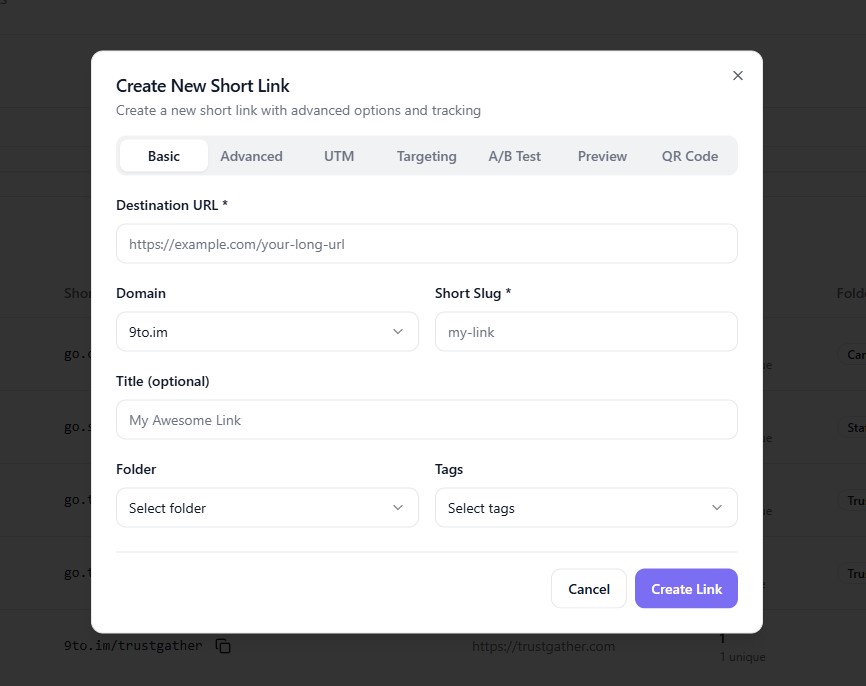
Add your destination URL
Choose a custom domain
Set a custom slug
Organize with folders and tags
You can also configure advanced options like:
UTM tracking
Geo targeting
Device routing
A/B testing
Expiration and password protection
👉 This is where your link becomes “smart.”
📤 Step 2: Share Your Link
Once your link is created, you can share it anywhere:
Social media
Email campaigns
Ads (Google, Facebook, etc.)
SMS or WhatsApp
QR codes (offline campaigns)
👉 Your single link can be used across multiple channels.
⚡ Step 3: User Clicks the Link
When someone clicks your link:
The request is processed instantly
9to identifies user details such as:
Location
Device type
Browser
👉 This happens in milliseconds.
🎯 Step 4: Smart Routing & Redirection
Based on your settings, 9to decides where to send the user:
🌍 Geo Targeting
Redirect users based on country or region
📱 Device Targeting
Send mobile and desktop users to different pages
🧪 A/B Testing
Split traffic between multiple URLs
⏳ Expiration & Fallback
Redirect users if a link has expired
👉 This ensures every user sees the most relevant content.
📊 Step 5: Tracking & Data Collection
Every interaction is tracked automatically:
Clicks (total & unique)
Location (country, region)
Device and browser
Referrer source
UTM parameters
👉 All data is stored and processed in real-time.
📈 Step 6: Analyze Performance
You can view all data in the analytics dashboard:
Click trends over time
Top-performing regions
Device breakdown
Campaign performance
👉 This helps you understand what’s working and what’s not.
🔄 Step 7: Optimize & Improve
Based on insights, you can:
Update destination URLs
Adjust targeting rules
Run A/B tests
Improve campaigns
👉 Optimization is continuous.
🧠 Behind the Scenes
While the process looks simple, 9to handles complex operations:
⚡ Fast global redirects
🔒 Secure link handling
📊 Real-time analytics processing
🔁 Smart routing logic
👉 All optimized for speed and reliability.
🎯 Real Example Workflow
Here’s a simple example:
You create a link for a campaign
Add UTM parameters and geo targeting
Share it on Facebook and email
Users click from different countries
Each user is redirected to the correct version
You track performance in dashboard
Optimize based on results
💡 Why This Workflow Matters
This system helps you:
Make data-driven decisions
Improve conversion rates
Deliver personalized experiences
Track every campaign accurately
👉 Instead of guessing, you rely on real data.
🏁 Conclusion
9to.in works as a complete link management system—from creation to optimization. Every click is tracked, every user is routed intelligently, and every campaign can be improved using real insights.
Once you understand how it works, you can unlock the full power of your links 🚀